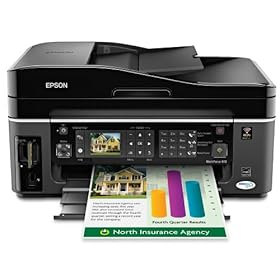
Epson WorkForce 610 Color Inkjet All-In-One Printer

This remarkable product manages to print documents up to two-times faster than leading color inkjet alternatives from competitive companies...

Activate Account Administrator di Windows 7 dan Vista : > "Run as administrator"...

HOW TO COPE VIRUS SHORTCUT 1234 RUNMIT

The characteristics of affected Virus 1234 Shortcut: 1. Shortcut Virus 1234 Runmit WATERMARK.EXE this will make the existing file in two places, namely:...

HOW TO SOLVE ERROR C000 ON CANON PIXMA MX870

How to solve error C000 on Canon Pixma MX870 Solution 1: Switch off the printer Disconnect the power cable Open door: ....

SPESIFIKASI TOSHIBA SATELLITE L645-1147XB

Spesifikasi Laptop Toshiba Satellite L645-1147XB O/S: Microsoft Windows 7 Home Premium Processor: Intel® Core™ i5-480M Processor (2.67 GHz, Cache 3 MB). Chipset: Intel HM55. Memory: 2 GB DDR3 SODIMM PC-8500, Max. Memory 8 GB (2 DIMMs) Graphics Engine: ATI Mobility Radeon HD 5470 512 MB...

Thursday, February 3, 2011

How to solve Toner Sensor Error on Oki printers


After replacing your Toner or Drum you get this message: “Toner Sensor Error”.


This error appears on these printers: C3200n, C3520, C9200...


Solution:


Possible Cause #1: Toner cartridge may not be locked into the Drum properly or the Toner/Drum unit may not be locked into the printer correctly.


Resolution: Check the Toner cartridge Lock Lever (Figure 1) and make sure it is in the LOCKED position:


Possible Cause #2: Error may occur if the plastic Shutter / Flap on the side of the Toner cartridge is fully or partially down blocking the Toner Sensor window (C3000 Series printers).


Resolution: Move the Flap upward and out of the opening to allow for the Toner Sensor to become fully exposed prior to reinstalling the Toner and Drum combination. This is a simple, easy step you can perform. (Ref. Figure 2)


The safest way to move this shutter is either with a toothpick or something plastic. Do NOT use a paper clip or anything metal to move the shutter. A metal object may short out the sensor making the Toner cartridge useless.


Left: correct position -Right: incorrect position


Possible Cause #3: The Drum or Toner may be defective.


Resolution “A”:

Remove the Toner/Drum assembly (without touching the blue locking lever).

Look inside the printer to locate the sensor for the Toner/Drum assembly.

Blow canned air into the sensor to clear out any possible dust.

Wipe the sensor clean with an alcohol wipe.

Re-insert the Toner/Drum assembly into the printer.


Resolution “B”:

Swap the Toner/Drum assembly (without touching the blue locking lever) with another Toner/Drum assembly (if available).

If the Error stays with the Toner/Drum assembly, then you can assume the Toner/Drum is defective.

Normally you would start by replacing the Toner first. If that does not resolve it, then try replacing the Drum.

If the Error stays with the same location, then you can assume the Printer is defective.


Wednesday, February 2, 2011

BulletScan M40 Photo Scanner Scans and Uploads Photos, Business Cards

iVina announced that it has enabled its BulletScan M40 mobile scanner to scan and upload color photos, business cards and receipts to document and photo sharing sites without any PC by simply plugging in the pre-configured Eye-Fi card into the scanner’s USB port or SD Card slot. To add this valuable feature to the BulletScan M40, registered users may go to http://www.bulletscan.com, select the M40 product and click on downloads to update the M40 to the latest firmware at no charge. With this new innovative capability, users may scan quickly and easily their color photos and documents to over 25 of the most popular photo sharing and document sharing websites.
“Scan and send documents and photos up to 4” x 8” to such popular sites such as Costco.com, Evernote, facebook, Flikr, Picassa, Shutterfly, SnapFish and walmart.com without any PC required,” said Murray L. Dennis, president and CEO of iVina, Inc. “With almost ubiquitous access to Wi-Fi at airports, hotels, restaurants, Starbucks, corporate offices, personal residences and public facilities, the BulletScan M40 is becoming one of the most intelligent, easy-to-use, compact and cost-effective solutions for capturing, storing and sharing your most important photos, business contacts and receipts anywhere you go.”
The BulletScan M40 Photo Scanner is for the person who needs to quickly convert photos or paper files to digital files anywhere. Ideal for archiving family photos or reliving favorite memories, the BulletScan M40 helps bring favorite photos into the digital age where they can be easily stored, found, viewed and shared with others. Scanned images are automatically cropped and straightened without any software to install. Scan a 4” x 6” photo at 300dpi in color in under 7 seconds. Offering the ultimate in portability, the BulletScan M40 automatically scans photos directly to USB Flash drive, SD or MicroSD card – there is no PC required in order to capture photos, business cards and receipts digitally.

Related Posts Plugin for WordPress, Blogger...